
Facebook Stories are ephemeral vertical photos and videos that vanish after 24 hours. Because millions of creators, celebrities, and public pages share exclusive behind-the-scenes moments, festival greetings, and viral clips via stories, having a reliable FB story saver allows you to keep these memorable media files permanently in your device storage.
Simple 3-Step Guide to Save Facebook Stories
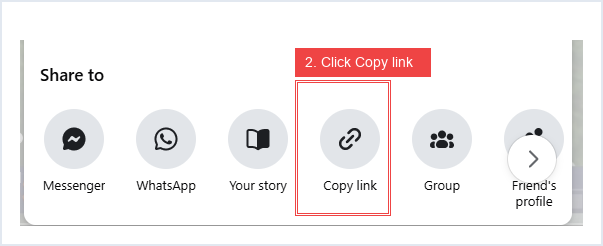
- Step 1 — Copy Story Link: Open the public Facebook Story on your smartphone or computer browser. Tap the three dots (•••) or the Share icon and click Copy link.
- Step 2 — Paste in Story Downloader: Paste the link into the search box above at
facebookreelsdownload.com/facebook-story-downloader.htmland click Download Story. - Step 3 — Save to Device: Pick your desired resolution (Full HD 1080p MP4 or extracted MP3 audio) and save the file directly to your Android Gallery, iPhone Camera Roll, or PC Downloads folder.
Why Choose Our Facebook Story Saver?
- Preserves Original Audio: Unlike screen recorders that capture notifications and background noise, our tool directly downloads the clean digital audio stream attached to the Story.
- No Watermark: All exported MP4 video files are free from promotional watermarks, time stamps, or compression artifacts.
- Cross-Platform Compatibility: Runs directly inside mobile Safari, Chrome, Samsung Internet, Firefox, and Edge without installing APKs or browser extensions.