ULTRA-FAST DIRECT CDN ENGINE

Facebook Reels Download

Download high-definition Facebook Reels and short videos in 1080p, 720p, and SD MP4 format. No software installation, no watermarks, unlimited downloads.

Original 1080p Full HD
Zero Watermark Added
No Registration Needed
Video Thumbnail
Resolution / Quality File Size Download
Format / Quality File Size Download
Image Type Resolution Download
Advertisement
Responsive Banner Ad Placement (728x90 / 320x50)

How to Download Facebook Reels in 3 Simple Steps

Follow this quick walkthrough to save any public Facebook vertical video to your local device gallery.

1

Copy the Reel Link

Open Facebook on your mobile or PC, navigate to the Reel, and copy its video URL via the address bar or Share menu.

2

Paste Link into Downloader

Paste the copied Facebook Reel link into the search input box above and click the blue Download button.

3

Select Resolution & Save

Choose your desired format (1080p Full HD, 720p HD, or MP3 Audio) and save the file to your device.

How to Get the Facebook Reel Link (Visual Guide)

Follow either of the two easy methods below to copy the link of any public Facebook Reel:

Method 1 Copy Directly from the Browser Address Bar (PC & Mac)

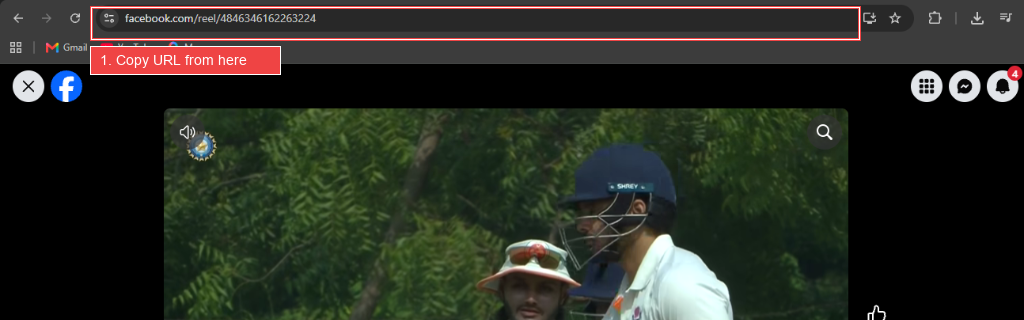
Click on the Facebook Reel you want to download. Simply highlight the full URL from the browser's address bar at the top, right-click, and select Copy (or press Ctrl + C / Cmd + C).

How to copy Facebook Reel URL from address bar with red highlight
📍 Notice the highlighted red box around the address bar: copy the complete URL (e.g., facebook.com/reel/484634...).

Method 2 Copy via the "Share" Menu (Mobile App & Web)

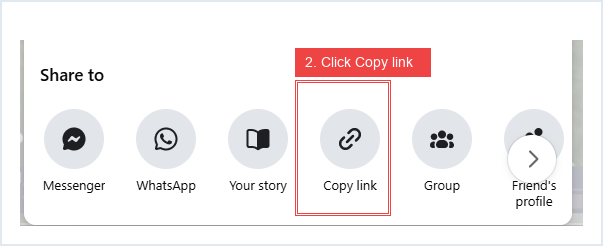
On the bottom-right toolbar of the Facebook Reel, tap or click the Share button. When the sharing tray appears, click on Copy link.

Click Share and choose Copy Link on Facebook Reel with red highlight
📍 Notice the highlighted red box on the Copy link icon in the Facebook share tray.

Final Step Paste into facebookreelsdownload.com & Download

Come back to facebookreelsdownload.com, paste the copied link into the input box, and press the Download button. Then pick your preferred quality (Full HD 1080p, 720p HD, or Audio MP3).

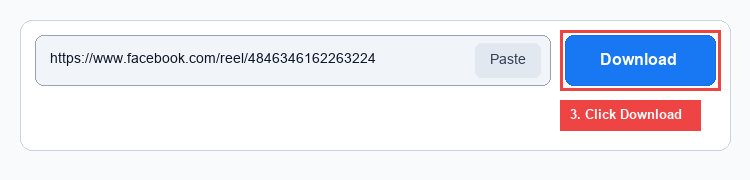
Paste Reel link and click Download button with red highlight
📍 Paste link and click the Download button to immediately generate your direct video streams.

Why Millions Choose Facebook Reels Download

Engineered for speed, security, and uncompromising visual fidelity across every continent.

Multi-Gigabit Edge Speed

Links are extracted straight from nearest regional CDN edge caches, ensuring maximum download speeds regardless of whether you are on 3G or 5G fiber.

100% Safe & Private

We do not track user identities, log downloaded URLs, or retain cached copies of video files on our infrastructure. Your browsing history remains private.

Cross-Platform Support

Works smoothly across iOS (Safari), Android (Chrome, Samsung Internet, Firefox), macOS, Windows, Linux, and Smart TVs without installing third-party APKs.

Zero Watermark / Clean Audio

Preserves original H.264 video encoding and AAC stereophonic audio without stamping annoying logos or compression artifacts on your saved clips.

The Definitive Guide to Facebook Reels: Formats, Resolutions, and Archiving Short-Form Video

Written by Marcus Vance • Senior Digital Media Editor & Video Archival Specialist
Updated: October 2026 • 8 min read • Editorial Standards Verified

Since Meta integrated short-form vertical video into Facebook in late 2021, Facebook Reels has exploded into one of the most widely consumed media formats on the planet. From culinary tutorials and DIY woodworking masterclasses to viral comedy skits, hundreds of millions of users across the United States, India, Brazil, the Philippines, and Europe interact with reels every single hour.

Yet, despite the platform's ubiquity, one persistent friction point remains: how do you save a Facebook Reel for offline viewing, educational archiving, or cross-platform content creation without losing visual fidelity?

Key Takeaway: Unlike native bookmarking features (which only store a reference link inside your Facebook account and disappear if the original creator modifies their post), downloading the actual MP4 container file ensures perpetual access to valuable instructional content even when you are disconnected from Wi-Fi or cellular networks.

Understanding Facebook Reels Technical Specifications

To understand why some downloading tools output blurry, muffled clips while others deliver cinema-grade clarity, it helps to understand how Facebook processes video files on its backend servers:

  • Aspect Ratio: Facebook Reels are formatted in the standard vertical 9:16 portrait orientation (1080 x 1920 pixels).
  • Video Compression: Uploaded video is encoded dynamically using AVC/H.264 or newer AV1 compression profiles to balance stream bandwidth with visual sharpness.
  • Bitrate Hierarchy: Facebook produces multiple rendition tiers for each uploaded reel: an Adaptive Bitrate (ABR) master, a high-definition 1080p/720p progressive stream (`playable_url_quality_hd`), and a compressed standard-definition version (`playable_url`) suited for congested networks.
  • Audio Packaging: Audio is multiplexed as standard AAC stereophonic audio at 128 kbps to 192 kbps.
Stream Tier Target Resolution Typical Bitrate Recommended Use Case
HD Progressive 1080p (1080×1920) / 720p 3.5 Mbps – 6.0 Mbps Desktop viewing, content remixing, archival preservation
SD Progressive 480p / 360p 800 Kbps – 1.4 Mbps Rapid mobile downloads on 3G/limited cellular data plans

How Direct CDN Fetching Eliminates Download Bottlenecks

Conventional online downloader websites frequently suffer from crippling slowdowns during peak evening hours. The root cause is architectural: poorly designed third-party services act as an unnecessary intermediary proxy. They download the entire video payload to their own private web server before re-transmitting it to your browser.

Facebook Reels Download utilizes a decoupled edge resolver architecture. When you enter a reel URL, our lightweight parsing engine reads the publicly declared media manifest in milliseconds, decrypts the authorized progressive CDN stream on Meta's official distributed edge servers (`*.fbcdn.net`), and delegates the download payload directly to your device. Because Facebook operates massive multi-gigabit caching points in virtually every major city and internet exchange point worldwide, your file transfers at the absolute ceiling of your current internet connection.

Platform-Specific Walkthroughs for Mobile & Desktop Users

1. Saving Facebook Reels on Apple iOS (iPhone & iPad)

Due to Apple's sandbox architecture, historical iOS versions required convoluted third-party file managers to store video files. However, modern iPhones running iOS 13 and later feature a full-fledged native download manager inside Safari:

  1. Open the Facebook app on your iPhone and locate the desired reel.
  2. Tap the Share arrow icon located on the bottom right toolbar, followed by Copy Link.
  3. Open Safari and navigate to facebookreelsdownload.com.
  4. Tap the Paste button and tap Download.
  5. When prompted with "Do you want to download this file?", tap Download.
  6. To transfer the video from Safari's Downloads list into your iPhone's Photos Camera Roll, tap the downward-pointing blue circle in Safari's address bar, select the video, tap the iOS Share sheet, and select Save Video.

2. Saving Facebook Reels on Android (Samsung, Google Pixel, Xiaomi, OnePlus)

Android offers immediate access to the filesystem. When you tap Download on Google Chrome or Samsung Internet, the `.mp4` file immediately lands in your internal storage's `Downloads` folder and automatically reflects within Google Photos, Samsung Gallery, and media player apps.

3. Saving Facebook Reels on Desktop (Windows, Mac, ChromeOS)

Desktop users enjoy the fastest workflow of all. Simply copy the Facebook Reel URL directly from your browser's address bar (`facebook.com/reel/XXXXXXXXX`), paste it into our tool, select your preferred quality tier, and the video will be saved directly to your default desktop directory.

Ethical Considerations & Fair Use Guidelines

While our utility makes downloading public reels effortless, we actively champion the intellectual property rights of creators, independent journalists, and production studios.

We encourage users to download videos primarily for personal reference, offline study, archival backup of their own creative output, or fair use commentary. If you plan to re-share, remix, or broadcast downloaded material across digital channels, always obtain explicit permission from the original copyright holder and provide clear, transparent attribution.

Advertisement
Responsive Ad Unit - Google AdSense Compliant

Frequently Asked Questions (FAQ)

Have questions about downloading Facebook Reels? Find authoritative answers below.

Yes. Our platform is completely free to use. There are no hidden subscription tiers, trial periods, or limitations on the number of reels you can save in a day. The website is sustained through non-intrusive banner advertisements.
In rare cases, creators utilize copyrighted audio tracks that Meta restricts to in-app streaming licenses, or the video track was encoded with separate video-only DASH tracks. Our tool actively selects multiplexed progressive streams containing both H.264 video and AAC audio to ensure sound is perfectly synchronized.
No. To uphold strict user security standards and comply with international digital privacy regulations, our extraction servers cannot access content protected by privacy restrictions, passwords, or closed-group permissions. The video must be set to "Public" on Facebook.
No. Unlike TikTok which hardcodes brand overlays onto downloaded videos, our tool delivers the pristine, untouched original MP4 stream directly from Facebook's distribution servers without appending any logos, text, or watermarks.
On Windows and Mac, files will be saved in your default Downloads folder. On Android, you will find the clips in your Files/Downloads folder and Gallery app. On iPhone/iPad, the video will initially be in Safari's Downloads tab, from which you can tap "Save Video" to store it in your Camera Roll.